Discord Web Presence Now Decides Which Server Channels Strangers Can Read
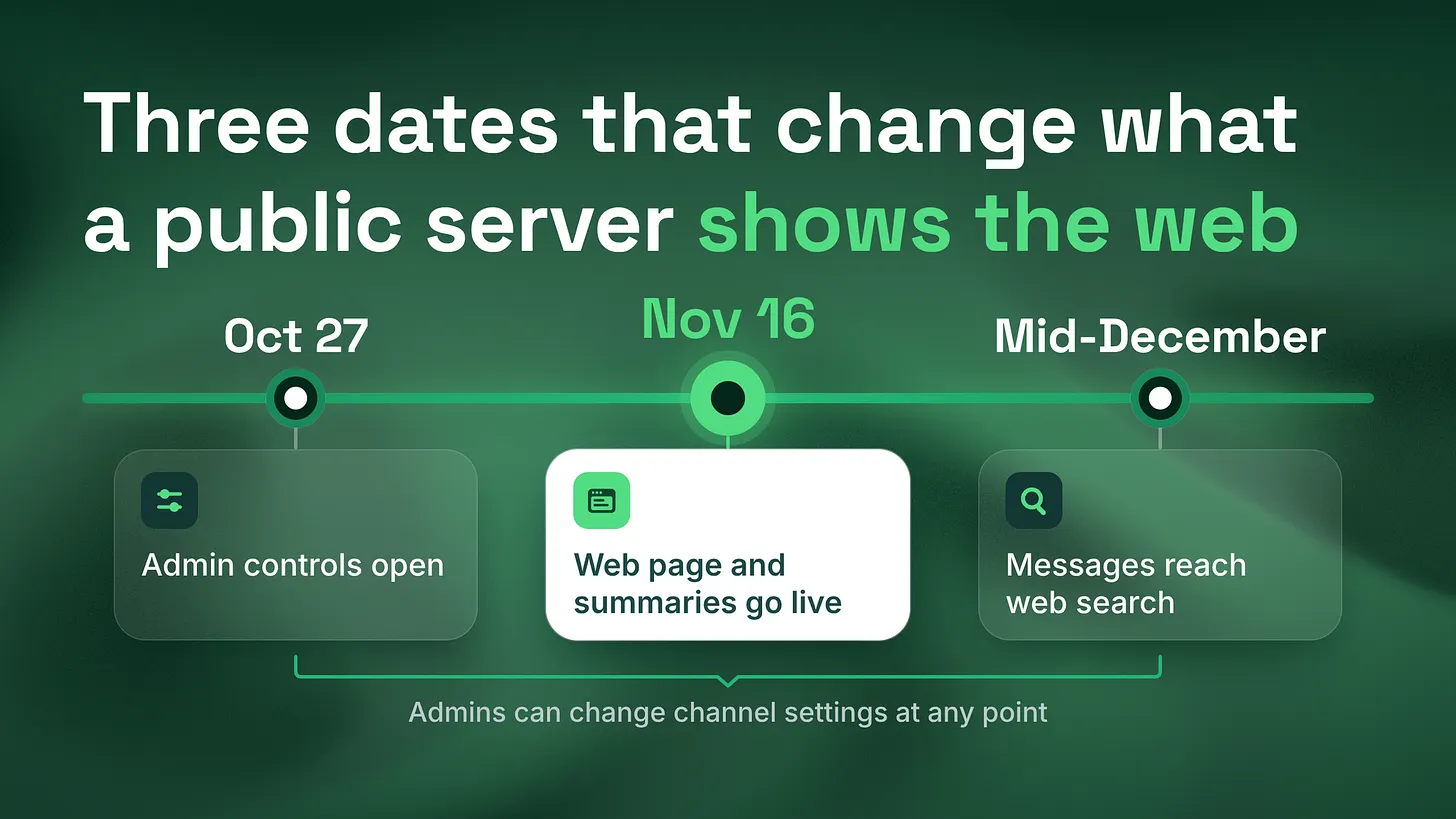
A channel-by-channel sort for admins of Discoverable servers, whose Server Web Pages go live from November 16, 2026 and whose public messages can reach web search from mid-December 2026.

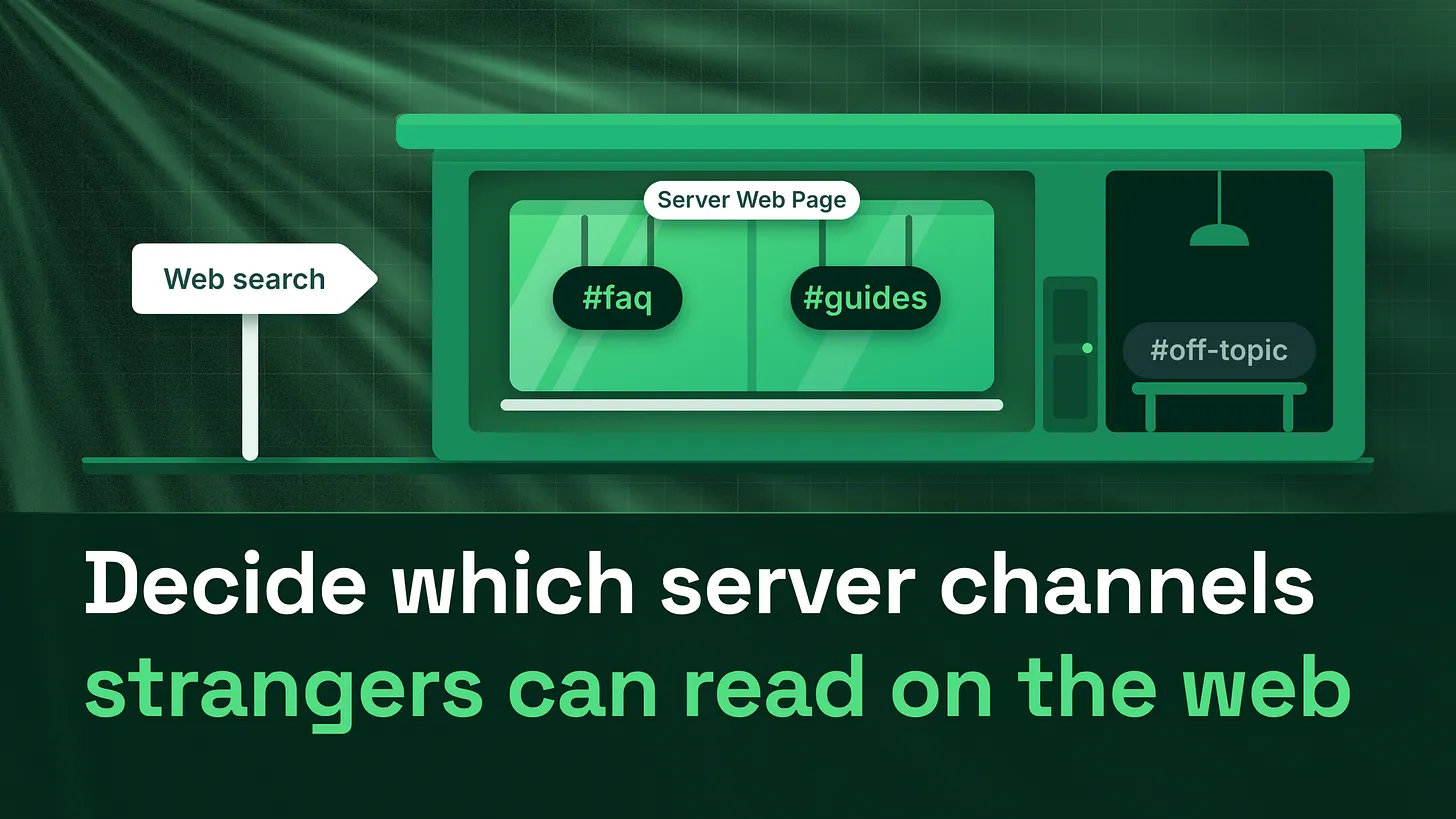
If your server is listed in Discord's Server Discovery, its public channels feed a public web page from November 16, 2026 unless you choose otherwise, and messages can reach web search from mid-December 2026. The Discord Web Presence settings for admins let you pick which channels take part. Sort each public channel with three questions, rewrite the default page, and tell members first.
Which of your public channels would you be comfortable seeing on a search results page, under your server's name, read by someone who has never joined? Discord gave that question a place in your settings. It added a tab called Web Presence to Server Settings, and it is where admins of Discoverable servers choose which public channels feed a public web page and, from mid-December 2026, web search. Do nothing and every public channel stays switched on. The settings work before and after Discord's rollout dates, so whenever you read this, the job is the same: go through the list and decide channel by channel.
Check whether your server is affected at all
Only one type of server is in scope. Discord splits servers into private servers, Community servers and Discoverable servers, and Discord's October 2026 announcement is explicit that private servers, DMs and group DMs stay private and are not part of the change. A Discoverable server is a Community server that has been listed in Server Discovery, so anyone can find it and join without an invite. Getting listed is not automatic. Discord's help center, checked in November 2026, lists the requirements: at least 1,000 members, a server at least eight weeks old, activity requirements, safety settings switched on, a clean server name, description and channel names, and the 2FA Requirement For Moderation setting turned on. If you are not sure which type your server is, open Server Settings and look under the Community category for a Discovery tab. If Discovery was never set up, nothing in this article changes your server today. If it was, keep reading. There is one more way out, and it is a blunt one. Discord treats the Server Web Page as part of being Discoverable. The only way to remove the page is to switch the server back to a plain Community server, which also takes it out of Server Discovery. For a server that relies on Discovery to be found, that trade rarely makes sense, so the useful work happens inside the Web Presence tab.
-
	-
The terms that now decide what strangers read
Discord's announcement introduces several names at once, and they behave differently. The table sorts them by what each one shows, when it starts and who controls it.
| Term | What it is | Starts | Who controls it |
|---|---|---|---|
| Server Web Page | A public web page describing a Discoverable server so people can decide whether to join | November 16, 2026 | Admins, in Server Settings, then Web Presence |
| Channel Summaries | Automated summaries of active conversations, shown on the Server Web Page, without usernames or avatars | November 16, 2026, covering conversations from that date | Admins choose the channels, can curate summaries, or turn them off |
| Channel Messages | Messages from public channels that can appear on the Server Web Page and in web search, without usernames or avatars | Rolling out from mid-December 2026 | Admins choose the channels; each member can also opt out |
| Public channel | A channel visible to everyone in the server, the only kind that can feed Channel Messages | Already true of your setup | Whoever sets channel permissions |
| Member web setting | Show my message content from Discoverable channels on web pages, under User Settings, then Data and Privacy | Available since October 27, 2026 | Each member, once, for every Discoverable server they are in |
Three details in that table carry most of the risk. First, the default is on: Discord says that if admins do nothing, public channels stay on and a default Server Web Page is published on November 16, 2026 using details from the Server Profile. Second, the member setting does not cover summaries. A member who switches it off keeps their own future messages off the web, but the automated summary of a channel they talk in is still the admin's call. Third, the member setting is on by default in most places. Discord says it starts switched off only for people in the EU, UK, Canada, Brazil, Australia and South Korea, and teen accounts are excluded entirely.
Old messages are safe from this change. Discord says messages sent before mid-December 2026 are not shown, so older channel history does not get pulled onto the web. What can be published is what members write from mid-December 2026 onward.
Sorting your public channels with three questions
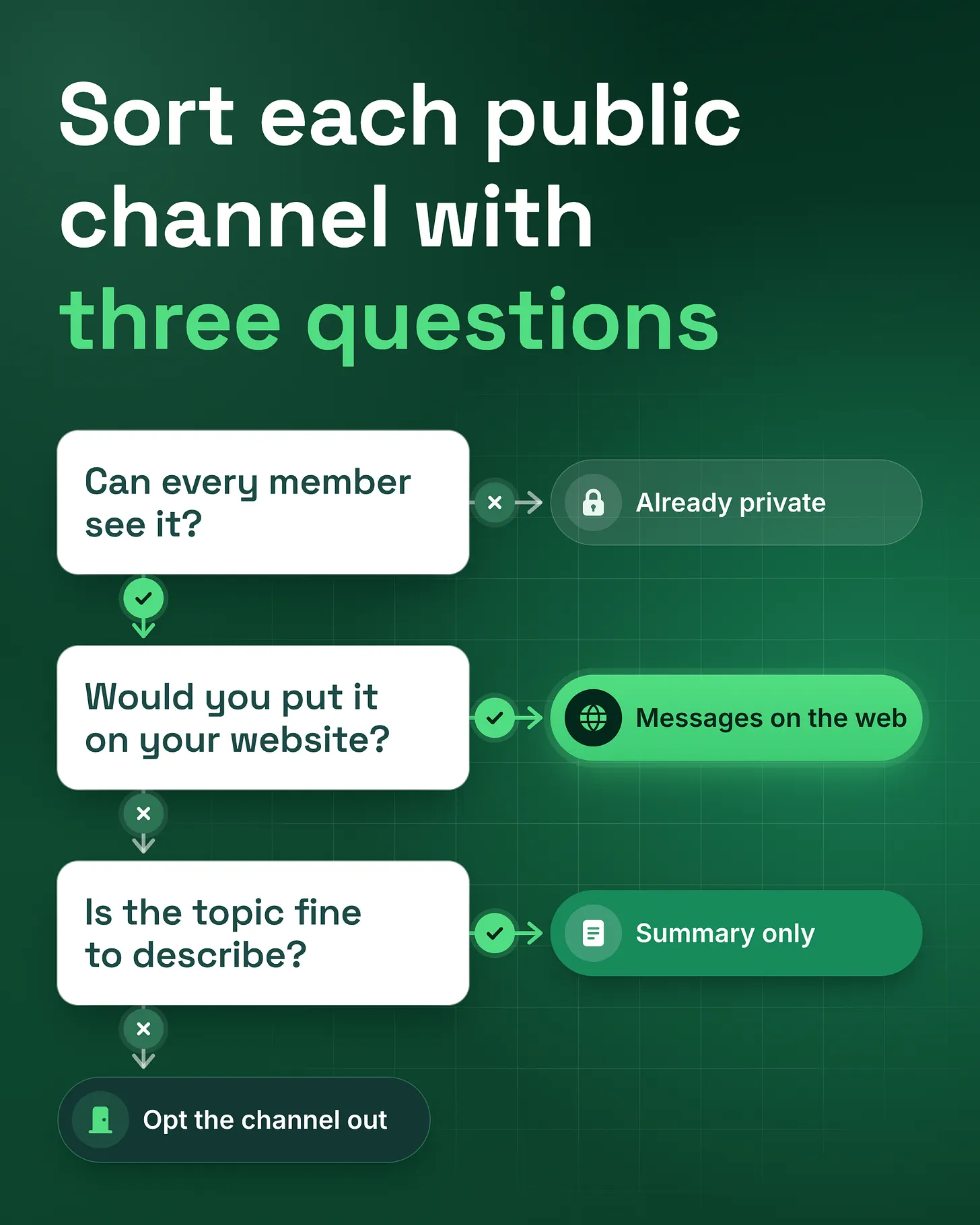
The Web Presence tab lets you choose channels separately for summaries and for messages, which gives every public channel three possible states. It can share its messages on the web, it can feed only the automated summary on the Server Web Page, or it can be opted out of both. Three questions, asked in order, sort a channel into one of them.
Can everyone in the server see this channel? Discord limits Channel Messages to channels visible to everyone in the server. A staff room, a paid tier channel or anything gated by a role that only some members hold is not a public channel in that sense. If a channel fails this question, it is already outside the scope of messages, and you can move on.
Would you put this content on your own website? Think of your help forum, a FAQ channel, a guides channel, a showcase where members post finished work, or an announcements channel. These are channels a stranger would learn something useful from, and channels you would happily see quoted under your brand. If the answer is yes, leave messages on. If the answer is no, or "it depends who posted that day", move on to the third question.
Is the general topic fine to describe, even if the individual messages are not? A busy general chat is a fair example. You might not want a stranger reading a single off the cuff message out of context, but a short summary of what people are discussing can help someone decide to join. If the topic is fine to describe, turn messages off and keep summaries on. If even a summary would be a problem, opt the channel out of both. Channels where members share personal situations, complain about orders, post screenshots of their accounts, report bugs with their details or vent tend to belong in that last group.
 Run the questions against your actual channel list, not the channel names you remember. Servers tend to collect channels nobody has looked at in months, and an old public channel still counts. When a channel sits on the border, choose the more private state. You can open a channel to the web later once you have watched how the summaries read, while a message that reached a search engine is harder to pull back.
Rewrite the Server Web Page Discord builds for you
The Server Web Page is the first thing a stranger sees, and for any Discoverable server without its own published page on November 16, 2026, Discord builds a default page from the Server Profile. That makes the Server Profile the copy you are really editing. Read your server description as a stranger landing from a search engine would. Does it say what the community is for, who it is for and what happens after joining? Many server descriptions were written years ago for people who already knew the brand, and they read that way. Discord says admins can publish their own page or edit the default whenever they like, so you never have to keep the first draft. Write the description for someone who found you through a question they typed, not through your marketing. Name the product or topic plainly, say what members get from being inside, and point to the first channel a newcomer should open.
Tell members what the labels mean
Discord says channels whose content may appear on the web will be labelled, so members know before they send a message. A label nobody explained tends to cause a rush of questions, and in some communities, real worry. Post a short announcement, ahead of the labels if you can and straight away if they are already showing, that covers four things: which channels are on the web, which feed only a summary, what stays inside, and how a member can keep their own messages off the web.
What members need to know, in plain words: some public channels in this server will appear on a public web page, and from mid-December 2026 their messages can show up in web search without usernames or avatars. You can keep your own messages out of it under
User Settings, thenData and Privacy, by switching offShow my message content from Discoverable channels on web pages. Turning it off stops future messages from appearing. Messages already shown stay up unless you delete them.
That last sentence matters for trust. Discord's announcement says switching the member setting off stops future messages from appearing, while messages already shown stay up unless deleted from Discord. Members deserve to know that before they post, not after.
-
	-
Moderation once your chat has outside readers
A channel with messages on the web changes what a missed message costs. A scam link that sits in a public channel for an hour used to reach members who were online. Once that channel feeds web search, the same message can be read by people who will never join, under your server's name. Three adjustments help. Tighten AutoMod on every channel you leave on. Keyword and pattern rules that catch scam phrases and unwanted invite links matter more in a channel strangers can read. If your AutoMod setup was built for a members-only room, review it channel by channel for the ones you just opened. Treat deletion as the removal path. Discord's own wording for members is that messages already shown stay up unless deleted from Discord, so the moderator's delete button is now also how a bad message leaves the web page. Search engines keep their own copies for a while after a page changes, which is one more reason to keep risky channels off from the start. Check the page after each rollout date. Open your Server Web Page once it is live, from November 16, 2026, and read the summaries the way a stranger would. Then search for your server once messages are rolling out, from mid-December 2026. If both dates have passed, do both checks today. If a summary reads badly or a channel attracts the wrong kind of post, change its setting. Discord lets admins adjust which channels are used and curate the summaries, so the first weeks are a chance to correct course. This one tab touches several parts of how a community runs: the channel structure that decides what is public, the moderation and safety setup that keeps public channels clean, and the path a newcomer takes from a search result to the page, through the invite and onboarding, into their first channel. Sorting the channels fixes the immediate exposure. The page and the onboarding behind it decide whether the strangers who find you actually join.
Where to go from here. The Server Web Page is now part of your branding, and How to Brand a Discord Server? Four Places Members See, From the Invite to Every Bot Message covers the surfaces a newcomer meets next; more pieces sit on the articles page. For an outside opinion on which channels to open, the free community analysis is a straight, no-jargon breakdown of your community, what works, what doesn't, and what to fix first, delivered within 24 hours. And if the sort shows that the channel structure itself needs rebuilding, the Server Buildout on communitymanagementpro.com covers channel structure, roles and permissions, and the welcome flow, ready to launch once you approve it.
*A public channel used to mean public to members. Since Discord's late 2026 rollout, it can mean public to anyone with a search bar, so choose deliberately. *danieljeong.org