How to Split a Large Discord Community Into Smaller Groups: A Map of What Breaks at Each Size
What breaks in the main chat at 100, 1,000, 10,000 and 100,000 members, the three checks that justify a new interest group, who should host it, and when to close it.

The answer to how to split a large Discord community into smaller groups is to wait until a group already exists in the main chat. When the same few members raise the same topic every week and it crowds out other talk, give them a channel, a host from inside the group and a review date. Groups a team invents stay empty.
Split where a group already exists
One main chat works while a community is small. As membership climbs, the chat moves too fast to follow, people who share an interest cannot find each other in the scroll, and regulars drift away because the room no longer feels like theirs. Smaller interest groups fix all three problems. They only work when the group is already there in the chat before its channel is. The method has three moves. Watch the main chat for a topic that keeps coming back among the same people. Give that group a channel of its own and a named host who is one of them. Set a date to review the channel, and close it in the open if it has gone quiet. A few Discord terms carry the rest of this piece:
- Channel. A room inside a server, listed in the sidebar with a hash in front of its name.
- Role. A label on a member's account. A role can decide which channels a member sees, and staff can notify everyone who holds it at once.
- Thread. A side discussion with its own title that hangs off a channel, so one topic can run without filling the channel itself.
- Onboarding. Discord's built in join flow for Community servers. It asks new members multiple choice questions, and each answer can assign roles and channels.
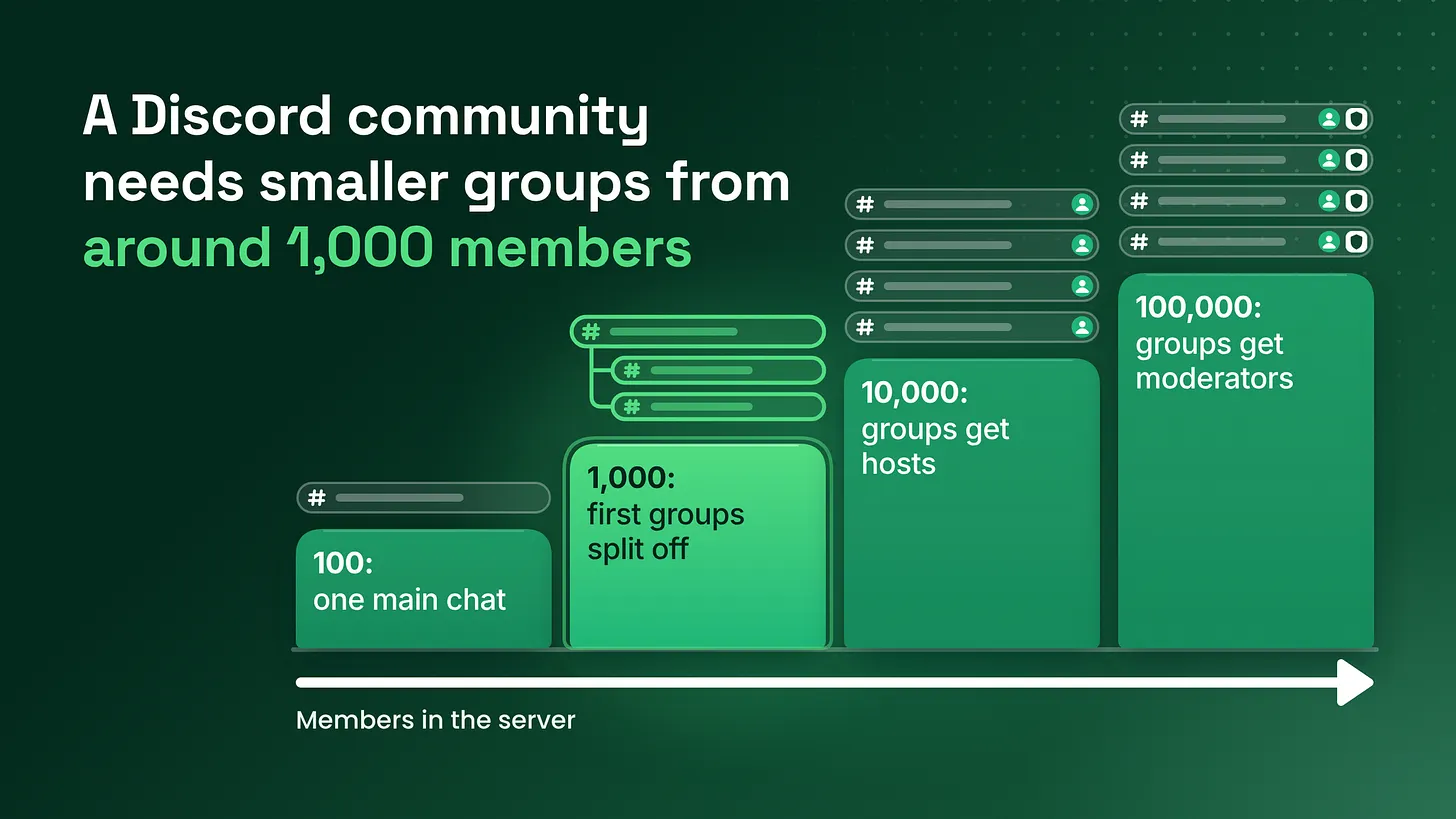
- Subgroup. In this piece, an interest group inside one server, made of a channel, a role and a host. What a server needs changes with its size. I work with four rough stages: around 100 members, around 1,000, around 10,000 and around 100,000. Treat the numbers as markers, and expect your own server to reach each problem a little earlier or later. I managed BlueWillow's Discord through its rise from about 1K to 1.7M members, so every stage from 1,000 upward is one I have run day to day.
| Stage | What breaks | What subgroups need |
|---|---|---|
| Around 100 members | Nothing yet. One chat holds everyone | No subgroups. Keep a weekly note of repeat topics |
| Around 1,000 members | The main chat scrolls too fast and regulars post less | The first two or three groups, each one passing the split test |
| Around 10,000 members | New members cannot tell the groups apart or find the right one | A host, a one sentence description and a choice at the door |
| Around 100,000 members | Groups have their own disputes and spam, and quiet groups pile up | A named moderator for each group and a review on a fixed schedule |
Around 100 members: one chat is the right design
At this size everyone knows everyone. A member who posts about a narrow interest gets answered by the few other people who share it, in the same chat everybody else is reading, and nobody minds. Nothing is broken yet, so there is nothing to split. The one useful habit at this stage is a running note. Each week, write down any topic that came up more than once and who raised it. It takes a few minutes, and by the time the server reaches the next stage that note is the evidence for every decision about groups. Without it, the team ends up guessing which groups members want, and guessed groups are the ones that stay empty.
Around 1,000 members: the main chat scrolls too fast
Here the single chat starts to fail, and the team often misses it because a fast chat looks healthy from the inside. A member who opens the server after a day away cannot catch up. Two or three topics run on top of each other. Someone asks a question and it is buried under a different discussion within minutes. The regulars who made the room feel alive start posting less, because their topic keeps getting pushed off the screen. These are the signals to look for:
- Members reply to each other across a gap of unrelated messages.
- The same people raise the same subject week after week.
- Someone asks whether there is a place for a particular topic.
- A regular goes quiet and, when asked, says the chat is too busy to follow.
- Other members start complaining that one topic has taken over. The first two or three interest groups show up at this stage. They show up in the chat first, as a cluster of people already talking to each other, and the channel comes second. A channel can give an existing group more room. I have not seen one produce a group that was not already talking.
The split test: three checks before any channel opens
Run these against the last four weeks of the main chat.
- The topic recurs weekly. It should appear in each of the four weeks. A topic that flared once around a launch or a piece of news will be gone before the channel is set up.
- The same handful of people drive it. Write their names down. If the names change every week, you have a popular subject that the whole community enjoys, and that belongs in the main chat.
- It is crowding other talk. Other members scroll past it, or their own messages get lost under it. All three have to be true. When only some are, a channel is the wrong tool:
| What you see | What it means | What to do |
|---|---|---|
| Recurs weekly with the same people, and nobody is crowded out | The group is part of what keeps the main chat alive | Leave it where it is and check again next month |
| Recurs weekly and crowds the chat, with different people each time | A subject the whole community shares | Give it a standing thread in the main chat |
| The same people, intense for one week, then gone | A passing event | Wait |
| All three checks pass | A group that has outgrown the main chat | Open a channel, with a host and a review date |
I keep the result in a short record, one per topic:
Topic:
Weeks seen in the last four:
Members driving it (names):
What it is crowding out:
Asked for by a member: yes / no
Decision: channel / thread / wait
Host:
Review date:
Groups that a team invents from a planning document fail for a simple reason. They open with no members who already talk to each other. Staff post a starter question, two people answer, and the channel is quiet by the following week. A group that passed the test arrives with its own members and its own habit of talking.
One condition sits under all of this. Interest groups can only surface when the main chat has room for interests. If most messages are basic questions about how the product works, the chat is doing the job of a help desk, and the recurring topic you find will be a support issue. Members who arrive already understanding the product spend less time on basic questions, and that is what leaves space for the kind of talk subgroups come from. If your main chat is mostly basic questions, fix what members learn on the way in first, starting with a clear
#start-herechannel and one place where common answers live.
The host: one member, one thread a week
Every subgroup gets a host before it gets a channel. The host is a member of the group. A staff member assigned to look after it does not count, because the group then depends on a staff calendar. Choose from the names you wrote down for the second check. The person who raises the topic most often is the right first ask. Keep the request small and exact: start one thread a week in the group's channel. It can be a question, something they made, or a prompt for others to share their work. Moderation stays with staff, and the host is never asked to police anyone. In return the host gets two things:
- A host role. A visible label that tells the group who to look to, and tells the host the job is recognized.
- A direct line to staff. A private channel shared by hosts and staff, where a host can flag a problem or ask for something without waiting in a public queue.
If nobody in the group is willing to start one thread a week, the group is not ready for a channel. Leave the topic in the main chat and ask again in a month.
When a host steps back, ask the group for the next one before the weekly thread lapses. A gap of several weeks is hard for a group to recover from.
Around 10,000 members: groups need descriptions and a door
By now a server has several subgroups, and what breaks is finding them. Channel names that made sense to the people who were there at the start mean nothing to someone who joined today. New members land in the main chat, never come across the group that would have kept them, and leave. Hosts also disappear quietly at this size, because nobody is checking. Each group now needs three things. A named host. The same arrangement as before, with one addition: staff keep a list of every group and its current host, and look at it monthly. A short description. Every Discord channel has a topic, a line of text shown at the top of the channel. Use it for one sentence that says who the group is for and what happens there.
For members who [do what]. [Host name] starts a new thread every [day].
A way to choose the group at the door. Discord's onboarding can ask new members a multiple choice question and assign a role for each answer. Add one question about what the member is here to do, with one answer per subgroup and one answer for people who only want to look around. Each answer gives the group's role, so the member arrives already attached to a group and the host has someone to welcome. Members can change their answers later from the server's Channels and Roles page.
Onboarding question (several answers allowed)
"What are you here to do?"
  Share work and get feedback   ->  role for the feedback group
  Learn the advanced features   ->  role for the advanced group
  Find people to work with      ->  role for the partners group
  Just looking around for now   ->  no group role
One rule keeps the door honest. An answer is added to the onboarding question only after its group has passed the split test and has a host. New members should only ever be offered rooms that already have people in them. In a program built around creators, partners or ambassadors, the groups worth watching for are the ones that form around what members make or how they work, for example a format several of them produce or a goal they share.
Around 100,000 members: groups need moderators and a regular review
At this size a subgroup is large enough to have its own trouble, and two things break. The first is moderation. A busy group has its own disputes, spam and off topic floods, and the general moderators miss them because they are watching the main chat. Each active group needs a named moderator who is responsible for reading it, with a second person to cover when the first is away. The host and the moderator are different people with different jobs.
| Person | Who they are | Their job in the group |
|---|---|---|
| Host | A member of the group | Starts one thread a week and flags problems to staff |
| Moderator | Staff or a trusted volunteer | Reads the group, removes spam and settles disputes |
| Program owner | The person accountable for the server | Runs the review and decides which groups stay |
The second is build up. Over time the list of groups gets long, some of them have gone quiet, and nobody has checked which. That needs a review on a fixed schedule.
The review: close quiet groups in the open
Set the first review date on the day a group opens and write it in the record. Pick one period and use it for every group. I prefer a short first period for a new group, thirty days for example, and after that a review of every group together once a quarter. The review asks three questions: ✅ Did the host start a thread in most weeks? ✅ Did members other than the host post? ✅ Would anyone ask for the group back if it closed? Three outcomes are possible. The group stays as it is, the group stays and gets a new host, or the group is archived. Archiving here means moving the channel into a category at the bottom of the sidebar and setting it to read only, so the history stays and nobody can post. Tell people when you do it. Post a short note in the channel and in the main chat:
We are archiving #channel-name on [date]. It has been quiet for [period], and we want the list of groups to stay short and active. The history stays readable. If you want it back, tell a staff member and bring two other people who will post in it.
Archiving is cheaper than leaving an empty room visible. A new member who clicks into a group and finds that the last message is months old learns something about the whole server from it. Saying openly that a group has closed also shows members that someone looks after the list, which makes the remaining groups easier to trust.
What makes a subgroup last
The groups that are still active a year on share three properties.
They are built around something members do together. A group for people who make, build, practice or review each other's work gives members a reason to come back. A group about a subject people merely like gives them something to read. A quick test is to finish this sentence with a verb: In this group, members ___ together.
They have a host. Someone inside the group has agreed to start the discussion every week.
They were asked for. A member said they wanted it, or the split test showed the group was already there.
Before any group opens, I want a yes on every line:
✅ The topic has appeared in each of the last four weeks.
✅ I can name the handful of members driving it.
✅ It is crowding other talk in the main chat.
✅ One of those members has agreed to host.
✅ The channel topic holds its one sentence description.
✅ A review date is written down.
Where subgroups sit in the wider system
Subgroups are one part of role and channel architecture and engagement rhythm. Around them sit onboarding, moderation, documentation and reporting. Each of those touches the groups: onboarding decides whether members arrive understanding the product, moderation covers the groups once they are busy, documentation holds the answers that keep basic questions out of the chat, and reporting shows which groups are alive. Everything about when to create a group, who hosts it and when to close it is covered above and can be run without any of the other layers changing. The other layers are separate pieces of work. A sidebar is a record of what a community has asked for, as long as someone keeps checking it. Opening a group late costs a few weeks of a crowded chat, and opening one early costs a channel nobody uses. More at danieljeong.org.