How to Set Up a Job Board in a Discord Community That Members Trust: Four Parts and a Named Reviewer
A one-time poster check, a fixed form, a private review queue and a read-only channel, plus who owns the queue and how to test the path before it opens.

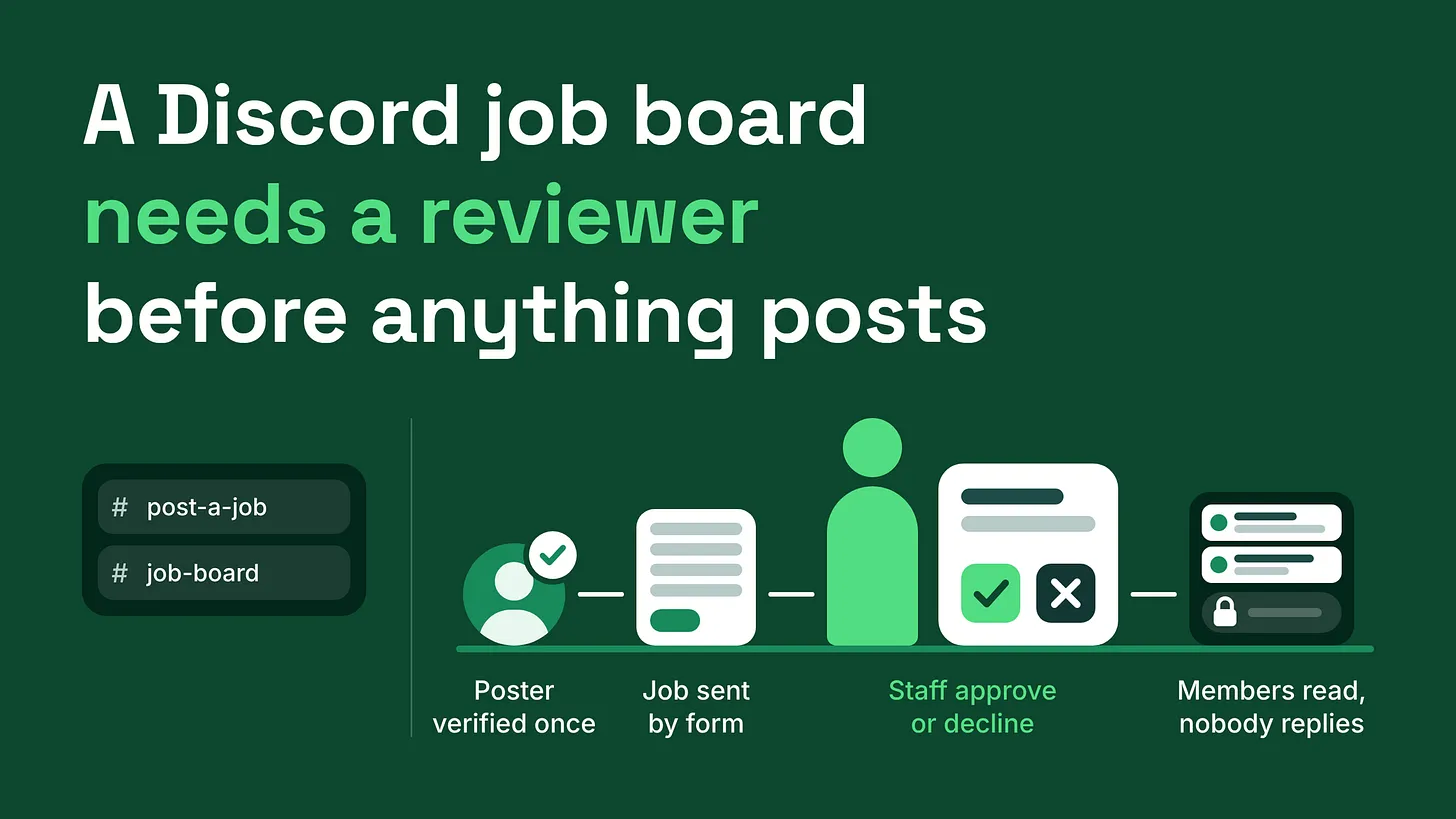
If you are working out how to set up a job board in a Discord community, build four parts: a one-time poster check that grants a role, a form with fixed fields, a private review queue and a read-only board. Name the person who approves each post, and publish nothing they have not read.
The short answer: four parts and a named reviewer
A job board that members trust is built from four parts, with a named person sitting between the form and the board. The parts are a verified poster role, a submission form, a review queue and a read-only board. People who post work enter through one door, people who want work read through another, and nothing is published until someone on your team has approved it. That structure exists because of how an open jobs channel fails. Anyone can post in it, so the first offers to arrive are the weak ones: vague work, no budget, a link nobody has checked. Anyone can reply in it, so each post disappears under messages from members pitching themselves. Businesses with real work stop posting because the replies are noise. Members who wanted work stop reading because the offers are.
A member who answers one bad offer in good faith stops reading the board, and every good post after that loses a reader.
Three terms appear throughout, so here they are once:
- A role is a label on a member's account. It decides what that member can see and do.
- A bot is an automated account. Here it shows the forms, carries submissions to staff and publishes approved jobs.
- A permission is a setting on a channel, such as whether a role can see it or send messages in it. You need a bot with forms and an approval step. Several offer both, and which one you pick matters far less than getting the four parts in place. I refer to the finished thing as a reviewed job board, and its layout is small:
| Category | Channel | Description |
|---|---|---|
| OPPORTUNITIES | #job-board | every member can read, nobody can reply |
| OPPORTUNITIES | #post-a-job | two buttons: "Get poster access" and "Post a job" |
| STAFF (private) | #job-review | every submission arrives here with Approve and Decline |
Part one: the verified poster role, a one-time check on who is posting
The first part answers a question about the person, before any question about the job. Someone who wants to post work presses Get poster access in #post-a-job and fills in a short profile:
- Who they are.
- Their business, in a sentence.
- A link where a member could look them up.
The profile lands in the private review channel. If the reviewer approves it, the bot gives the member a role, for example
@Verified Poster. That role does one thing: it lets them use the job form. It grants no extra channels and no staff permissions, so keep it well apart from your moderator roles. The check happens once. A poster who has been approved never fills in the profile again, which keeps repeat posting cheap for the businesses you most want back. It also splits the reviewer's work into two smaller decisions. The profile decides whether this person should be posting here at all. Each later submission only decides whether this particular job is fit to publish. When reviewing a profile, open the link. Check that it works, that it matches the name given and that a member could reasonably find out who they would be working for. A profile with no working link gets sent back. Decide what happens to a declined profile before the first one arrives. Two rules cover it. Tell the person why, once, in a single message, and take any second attempt through the form so it never becomes an argument in direct messages. Then decide in advance whether a declined poster stays in the server, because the reviewer should never have to improvise that.
| Why the profile was declined | What the poster is told | Do they stay in the server? |
|---|---|---|
| The profile is incomplete or the link does not work | What is missing, and that they can resubmit | Yes |
| The offer is a kind the board does not carry | What the board is for | Yes |
| The profile is deceptive or follows a known scam pattern | That the profile was declined | No, they are removed |
Part two: the submission form, the same fields for every job
A verified poster presses Post a job and a form opens. Every job is submitted through the same four fields.
Post a Job
| Field | Description |
|---|---|
| The work | What needs doing, in two or three sentences |
| Budget or range | A figure or a range |
| Timeline | When it starts and when it is due |
| How to respond | One method only: a link, an email address or a direct message |
Nobody types a post freehand. A freehand post leaves out whatever its writer would prefer to skip, and that is nearly always the budget. Required fields make that impossible. They also make every post on the board read the same way, so a member can compare two jobs at a glance. Two decisions belong on the panel above the buttons, in plain words, so posters see them before they start:
- What counts as a budget. My rule is a figure or a range. The word "negotiable" on its own gets the submission declined.
- What the board does not carry. If unpaid work or commission-only offers are out, say so on the panel.
Name the channel by the action a person takes in it.
#post-a-jobtells a business exactly what happens there. A name like#apply-hereleaves both groups guessing who is applying and for what, and members looking for work will press the wrong button. If a member without the role pressesPost a job, set the bot to answer privately with one line pointing them toGet poster access.
Part three: the review queue, a private channel where a named person decides
Every submission arrives in #job-review, a channel only staff can see, with two buttons under it: Approve and Decline. The reviewer reads it against a short list.
✅ The work is described clearly enough that a member can tell whether they qualify.
✅ The budget is a figure or a range.
✅ The response method works. Open the link or check the address.
✅ Nothing asks members to pay, buy something or send personal documents before the work starts.
Approve publishes the job to the board. Decline sends the poster a short reason and lets them submit again.
Sometimes a job is sound and the wording is the problem. On Discord, only the author of a message can edit it, and that holds for administrators too. Staff therefore cannot tidy a submission in place. Copy the text, correct it and publish the corrected version, then tell the poster what changed. Keep those corrections to spelling and clarity. If the budget or the terms need to change, decline it and let the poster resubmit, because those are the poster's decisions.
The queue only works if it belongs to someone. Write these down before launch:
| Question | Answer to write down |
|---|---|
| Who owns the review queue | One named person |
| Who covers when they are away | One named backup |
| How fast a submission gets an answer | A promise you can keep, for example one working day |
| Where decline reasons are recorded | As a reply under the submission in the review channel |
Print the response time on the panel in #post-a-job. A poster who knows the wait will wait. A poster who hears nothing assumes the submission vanished and posts the job somewhere else, and an unanswered queue teaches every business that the board is unstaffed.
Part four: the read-only board, where approved jobs publish and nobody replies
Approved jobs publish to #job-board. Members can read the channel and cannot write in it. For the member role, the channel's permissions look like this:
| PERMISSIONS | Status |
|---|---|
| View Channel | on |
| Read Message History | on |
| Send Messages | off |
| Create Public Threads | off |
| Create Private Threads | off |
The two thread settings matter. Leave them on and members will open a thread under a post and pitch there, which rebuilds the problem you just removed. A forum channel has the same weakness, since every forum post opens its own reply thread. Each published post ends with the response line the poster wrote in the form: JOB: Proofread and tidy a staff handbook Posted by a Verified Poster
| Field | Details |
|---|---|
| The work | Proofread a short handbook and fix its layout. |
| Budget | A stated range |
| Timeline | Starts Monday, due in two weeks |
| How to respond | Use the form at the link below. Direct messages are not read. |
One stated route protects the poster. Replies arrive in one place, at a pace the poster controls, and members know that a direct message sent against the instructions will be ignored. Decide how a post leaves the board. The simplest rule is a closing date on every post and a weekly sweep in which the reviewer removes anything past its date. A board full of filled jobs reads as abandoned. If your board is reserved for members who have finished a step, such as completing a member profile, keep the channel visible to everyone else and locked. Discord treats seeing a channel, reading its history and sending messages as separate permissions, so a channel can sit in the sidebar without being usable. Members who can see the locked board know what they are working toward. Members who want work will still look for somewhere to introduce themselves. Give that its own channel and its own form, and keep it out of the board.
Test the whole path before opening it
Run the board end to end with a test account in each role before any member sees it.
- As a member with no role, press
Post a job. You should be pointed toGet poster access. - Submit a poster profile, then decline it as the reviewer. Confirm the decline message arrives and reads the way you intended.
- Submit again, approve it and confirm the role appears on the test account.
- Submit a job with a deliberate typo. Correct it by copying and republishing, then approve it.
- As a plain member, open
#job-board. Try to type, and try to start a thread. Both should be blocked. - Follow the response line on the published post and confirm it leads somewhere real.
Discord's
View Server As Rolepreview is a fast way to check which channels a role can see. It is no substitute for a second account pressing the buttons.
Where the job board sits in the wider server
A job board is one piece of role and channel architecture: which roles exist, what each one opens and where each kind of member goes to act. It sits alongside onboarding, moderation, support routing, automation coverage and reporting, and it leans on each of them. Your #start-here channel should tell posters and job seekers where their door is. Your moderators need to know that pitching in other channels gets redirected to the board. Your reporting can take three counts straight from the review channel each month: submissions, approvals and declines.
Build the four parts in order, name the reviewer and test it with three accounts. After that, the measure to watch is whether businesses post a second time.
A job board carries your community's name on every offer it shows. A person who reads each one before members do is the cheapest protection that name will get. More at danieljeong.org.