How to Re-Engage Discord Members Who Never Finished Onboarding: Three Timed Follow-Ups
A day-by-day sequence for joiners who stalled before their first role, with the wording for each message, the rule that stops it, and the day you remove them.

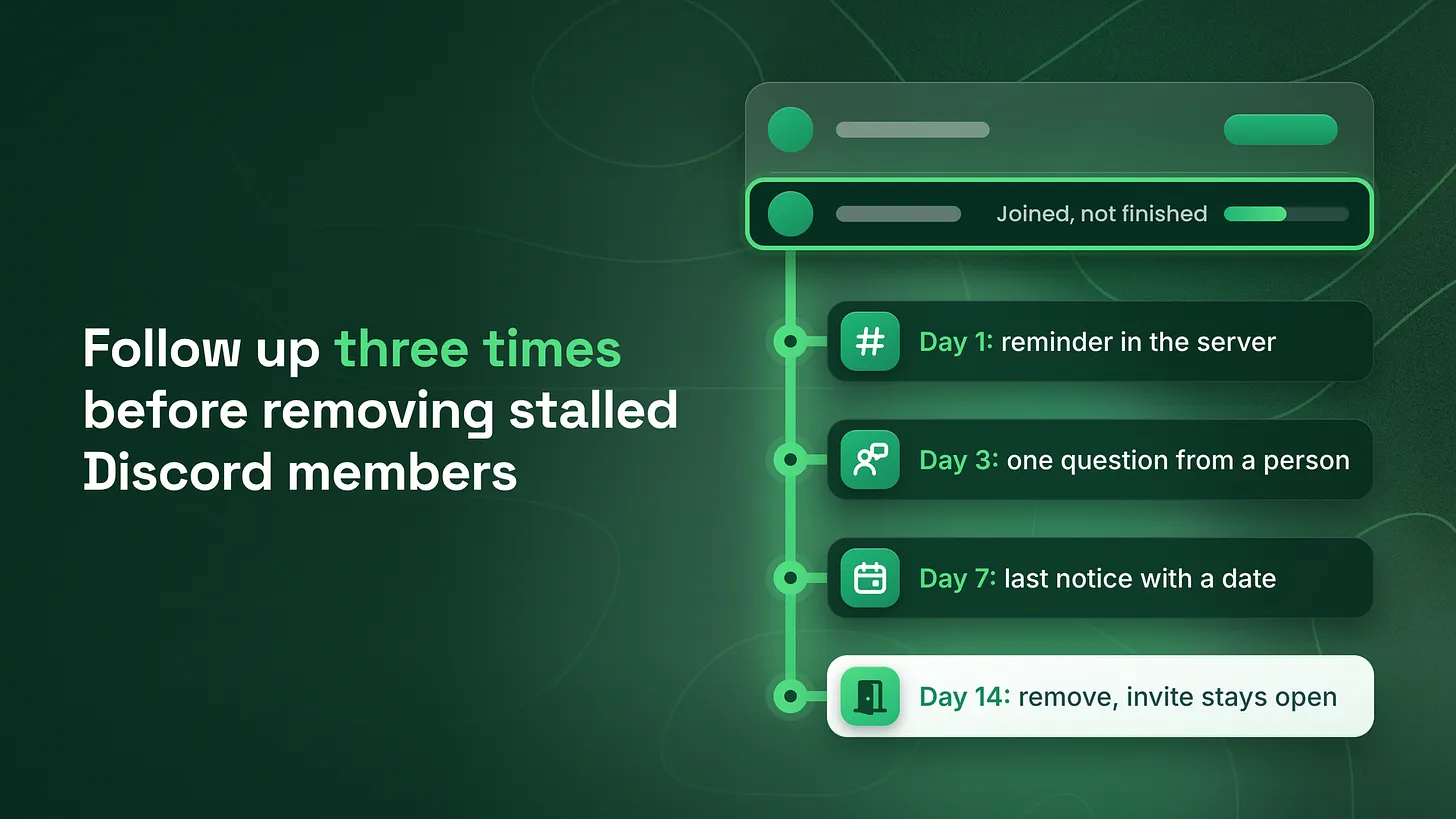
If you are asking how to re-engage Discord members who never finished onboarding, follow up three times on fixed days. Send a reminder in the server on day one, one small question from a named person on day three, and a last notice with a date on day seven. Any reply stops it. On day fourteen, remove with a kick and leave an invite open.
The names with no role, and what to do about them
Open your server's Members page and sort it by join date. This week's arrivals sit at the top. Read down the roles column and a pattern appears: a run of names with nothing beside them. Each of those people accepted your invite and stopped part-way. They can see almost nothing. They have said nothing. Every one of them still counts as a member. Most teams do one of two things with this group. They leave it alone, or they post another announcement to everyone. Neither gets an answer. Give each stalled joiner three short follow-ups on fixed days, then remove whoever stays silent and leave the door open.
| Day after joining | What happens | Who it comes from | Where |
|---|---|---|---|
| 1 | A reminder that names the one step left and what it opens | The server | The one channel a stalled joiner can see |
| 3 | One small question, answerable in a word | A named staff member | Direct message or private thread |
| 7 | A last notice with the removal date and an invite | The same staff member | Direct message or private thread |
| 14 | Removal by kick, with the invite left working | Staff or an automation bot | Inside the server, with a line in your log |
A reply at any point ends the sequence. So does finishing the step. The days are my recommendation. I use one, three, seven and fourteen. Move them if your server runs faster or slower, and keep the order. I managed BlueWillow's Discord through its rise from about 1K to 1.7M members, and this is the sequence I use. Four terms, explained once:
- A role is a label Discord attaches to a member. Roles decide which channels that member can see.
- Onboarding is everything a new member is asked to do between accepting the invite and seeing the full server.
- The entry role is the role a member receives when they finish that step.
- A
kickremoves a member and lets them come back with any working invite. Abanblocks the account from returning.
Step 1: Define "never finished" so anyone can check it
A stalled joiner is a member who joined more than one day ago and still holds no entry role. That definition has no judgment in it. Two people on your team reading the same list will mark the same names. It only works if an entry role exists. If your server uses Discord's Community Onboarding, the feature that asks new members questions when they arrive, you can make one. According to Discord's help center (2023), each pre-set answer to an onboarding question can assign channels and roles, and a question can be marked required. Attach the same entry role to every answer of one required question. Anyone who finished now holds it, and anyone who did not is visible. Then build the list. According to Discord's help center (2024), the Members page shows when each member joined, how they joined, their roles and whether they agreed to the rules. It can be sorted by join date, and it works on desktop or in a browser only.
- Sort the Members page by join date.
- Skip everyone who joined within the last day.
- Read down the roles column and write down every name with no entry role.
- Beside each name, note the join date and how they joined.
The first time you do this, the list will hold two groups. People who joined in the last fourteen days get the full sequence from wherever they are in it. Everyone older than that is backlog. Send the backlog the day seven notice only, with a removal date seven days out.
Step 2: Day one, a reminder inside the server
Post the first follow-up in the one channel a stalled joiner can see. In most servers that is the start here channel. If a member with no role can see no channel at all, give members without a role read access to that one channel first. A reminder has to land somewhere. Mention each stalled member by name. A mention is an at-sign followed by a name, and it sends that person a notification. Then name the single step and what opens when it is done. In the wording below, swap the second paragraph for your own step.
@name You are one step from the full server.

Press "Choose your path" at the top of this channel and pick
the option that fits you. That opens the help channels and the
main chat.

Stuck on it? Reply here and a person will help you.
Keep it to one step and one result. A new member who stalled on one small task does not need a tour of everything the server offers. If many people join each day, an automation bot can post this for anyone who still has no entry role a day after joining. Test it with a spare account before you rely on it.
Step 3: Day three, one question from a named person
The second follow-up comes from a person, by name, and asks one thing.
Hi, this is [first name] from the team at [server name].

One quick question so I can set you up properly.
Which fits you better?

A. I am here to get help with something
B. I am here to learn and talk with other members

Reply A or B and I will open the right channels for you.
The question is small on purpose. The member answers with one word, and staff do the rest of the step for them.
An announcement to the whole server is addressed to nobody in particular, so nobody feels asked. It often sits in a channel a stalled joiner cannot open. And it tells them to do the same step they already walked away from. A small question from a named person changes all three. It is addressed to one member. Answering takes one tap or one word. The answer is enough for staff to finish the step for the member: assign the entry role by hand, open the matching channels, and confirm in one line. The member never has to go back to the step that stopped them. Four rules keep the question small:
- Two options, both of them acceptable answers.
- Signed with a real first name, sent from that person's own account.
- No link and no instructions.
- Nothing to read before answering. Send it as a direct message. If it does not go through, open a private thread, a side conversation inside a channel that only the people added to it can see, and ask there. One person should own this step and the list behind it, so every stalled joiner hears from the same name twice.
Step 4: Day seven, a last notice with a date
The third follow-up is the last. It states the removal date, the way to stay, and that coming back later is welcome.
Hi, [first name] again. This is my last note.

Your access to [server name] is still not set up. On [date] we
remove accounts that never finished joining. It is housekeeping
and nothing against you.

To stay, reply A or B to my last message, or just reply here.

If now is a bad time, this link will let you back in whenever
you are ready: [invite link]
Check the invite before you send it. According to Discord's help center (2023), an invite link made in the app lasts 7 days by default. A link sent on day seven with that default is dead on day fourteen, the day it is needed. Use a link you have set to last, and open it yourself in a private browser window.
Step 5: Day fourteen, remove and leave the door open
Whoever is still silent on day fourteen is removed with a kick. Never use a ban for this. These people did nothing wrong, and a ban would stop them from ever coming back.
Write one line per removal in a log your team keeps.
REMOVAL LOG
Date removed:
Member:
Joined on:
Joined through:   which invite or source
Follow-ups sent:  day 1 / day 3 / day 7
Reply received:   none
Removed by:
Keep that log outside Discord. According to Discord's developer documentation (checked October 2026), the audit log, the built-in record of administrative actions, keeps entries for 45 days. Your own log is the record that lasts.
Discord has a tool for mass removal named prune, and it does a narrower job than its name suggests. According to Discord's help center (2022), prune removes members who have not logged in to Discord for a chosen period, 7 or 30 days in the app, and by default it only removes members who hold no roles. It measures absence from Discord as a whole. It knows nothing about your onboarding.
| Stalled joiner | Does prune catch them? | How to remove them |
|---|---|---|
| Joined, got no role, and stopped opening Discord entirely | Yes, once the chosen period has passed | Prune |
| Joined, got no role, and still uses Discord in other servers every day | No | By hand, one member at a time, or with an automation bot |
I run prune on the 30 day setting as an occasional sweep. Someone who has not opened Discord for 30 days joined at least 30 days ago, so they are already past day fourteen. The 7 day setting can remove a person who joined eight days ago and has not yet reached the date you promised them. Day fourteen removals themselves are done by hand or by an automation bot that checks for the missing entry role. One caution. Prune looks at members with no roles. If people who finished onboarding also hold no role in your server, prune will treat them the same as people who stalled. This is the second reason to create an entry role in Step 1.
Step 6: The stop condition
Any reply ends the sequence. Completing the step ends it too. Nobody who answered gets another automated message.
| What comes back | What staff do |
|---|---|
| An answer to the question | Assign the entry role and channels by hand the same day, and confirm in one line |
| A problem, such as a button that does nothing | Hand it to a person the same day, fix the member's access by hand, and record the problem for the weekly count |
| "Not for me" or "wrong server" | Thank them and send nothing more |
| No words, and the step gets completed | Take the name off the list |
The second row matters most. A reply that describes a problem is a free report on your join flow from someone who cared enough to write back. Treat it as work for a person, the same day.
Step 7: Count it every week
Once a week, the person who owns the list fills in six lines.
WEEK OF:
Joined:
Finished without help:
Finished after day 1 reminder:
Finished after day 3 question:
Finished after day 7 notice:
Removed on day 14:
Read the pattern across a few weeks.
- Many finish after the reminder. The step works and people are missing it. Make it more visible at the moment of joining.
- Many finish after the question. People were willing and the step stopped them. Read their replies for the reason.
- Most are removed in silence. Look at how those members joined. One invite source may be sending people who never meant to stay. If most people stall at the same step, that step is at fault. The fix belongs in the join flow, and no amount of follow-up replaces it.
Why remove anyone at all
Leaving silent accounts in place feels harmless. It costs three things.
- An honest member count. The number you report includes people who never got in. Every rate you work out from it is lower than it should be.
- Less mention noise. A server-wide mention notifies stalled members about a place they cannot use. Each one teaches them to ignore the next message from you.
- Fewer unknown accounts inside. An account that has held no role and said nothing for months is one nobody on your team can vouch for.
What this sequence is one part of
Follow-up for people who stall is one part of onboarding and the first 48 hours. The other parts are entry design, the welcome, the first action and human contact. Beside onboarding sit support routing, documentation and reporting. You can run everything above this week with the Members page, three messages and a log. It recovers the people who wanted in and got stuck. How many get stuck in the first place is decided earlier, by the step itself. ✅ This week: build the list, send the day three question to everyone on it, and set the first removal date. A person who stopped half-way has told you nothing yet, and one small question is the cheapest way to find out what they would have said. More at danieljeong.org.