Discord Invite Landing Page: Five Blocks to Show People Before They Click Join
A five-block page that tells visitors what your company does, who they will meet and what to do first, plus a way to see which link each new member came through.

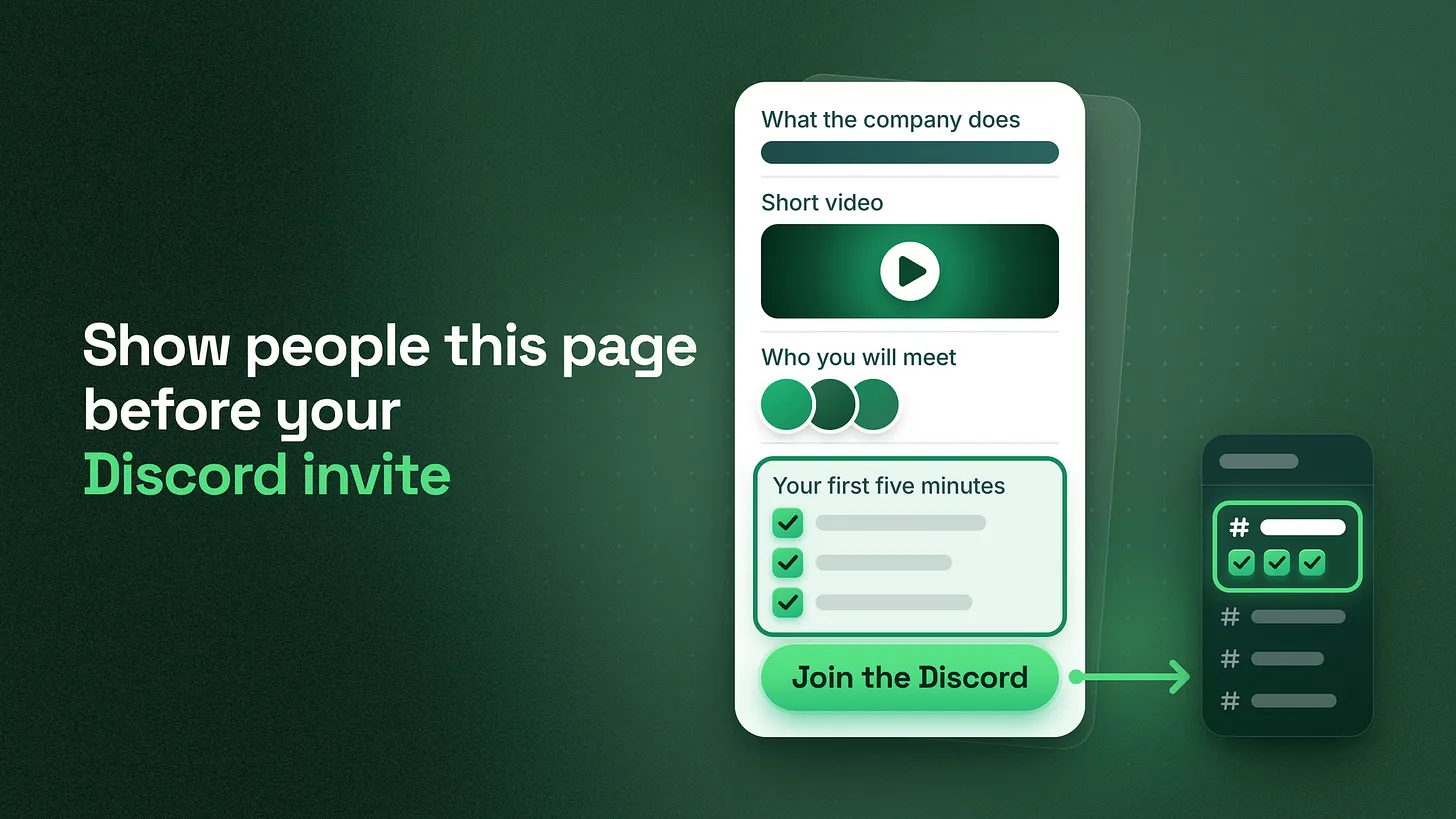
A Discord invite landing page is one short page shown before the invite. Build it from five blocks: what the company does, a short video, who people will meet, three first steps, and one button. Make the three steps match the server's first screen word for word, and give each source its own invite link.
Put a page in front of the invite
Put one short page between every public link and your Discord invite. Build it from five blocks in a fixed order, end it with a single button, and make that button the only place the invite lives. Someone who clicks from your bio, an email footer or a button inside your product then reads the page first and joins second. A few terms, explained once:
- A server is your company's space on Discord.
- A channel is one room inside the server. Channel names are written with a hash sign, such as
#start-here. - An invite link is the web address that lets a person join the server.
- The first screen is what a new member sees in the moments after joining. It is usually the first channel in the list and whatever is posted there. The page has a narrow job. It tells a visitor what the company does, who is inside and what to do first, and it promises exactly what the first screen then delivers. Judge it on what each arrival knows when they enter, since it has no effect on how many people see your link. I managed BlueWillow's Discord through its rise from about 1K to 1.7M members, and the questions newcomers ask on their first day are a dependable record of what nobody told them before they joined.
What a bare invite link leaves out
Most companies publish the invite itself. It sits in a social bio, in a newsletter footer, or behind a button that says "Join our Discord". One click and one more press, and the person is inside. That person knows very little. Many do not know what the company sells, because they followed a link from a post somebody else shared. They see a list of channels whose names make sense to your team and to nobody else. They look around for a few seconds and leave. Or they stay and ask the basics in the main chat: what this is, who runs it, where to start. In servers I audit, those same basics are asked over and over by different newcomers, and every answer takes time from someone on your team. People who arrive already knowing those things behave differently. In my experience they hold better conversations from their first message, because they ask about their own situation and skip the questions about what the room is for. They also need far less explaining from your team.
Before a visitor presses the invite, they should be able to say what the company does, name one person inside, and repeat the first step.
The five-block pre-join page
I use a fixed layout with a plain name: the five-block pre-join page. Each block answers one question the visitor is asking, in the order those questions come up.
| Block | What it holds | The visitor's question |
|---|---|---|
| 1. What the company does | One sentence that says what the product is and who the community is for | What is this? |
| 2. Short video | A recording that shows the inside of the server. I keep it under two minutes | What will I see in there? |
| 3. Who you will meet | Two or three named team members, each with a face and a one-line role | Who is inside? |
| 4. Your first five minutes | Exactly three steps, in the same words the server's first channel uses | What do I do first? |
| 5. The button | One button that carries the invite | How do I get in? |
Keep the whole page short enough to read on a phone in one pass, with no menu, sidebar or second page.
Each block, with example copy
The examples below are written for an invented product, a scheduling tool for small teams. Swap the bracketed parts for your own. Block 1: what the company does. Write one sentence with two halves. The first half says what the product is. The second half says who the community is for. A page that opens with "Welcome to our community" has told the visitor nothing about either. Test the sentence by asking someone outside the company to repeat it back.
[Product] is a scheduling tool for small teams, and this Discord is
for the people who build the weekly schedule with it.
Block 2: a short video. Show the inside of the server as it looks today: the channel list, one question being answered, and the place where the first step happens. Making that video is a separate subject. The one requirement here is that it shows the server a visitor will find when they join.
A look inside before you join (under two minutes)
Block 3: who you will meet. Show two or three team members, each with a face, a first name and a one-line role. This block puts people in the room before the visitor enters it, and a newcomer who recognises a name is more willing to post a first message. Pick people who do reply in the server, and take a person off the page on the day they leave the team.
[First name], product support. Answers setup questions on weekdays.
[First name], community lead. Hosts the schedule review sessions.
[First name], product manager. Reads every post in #feature-requests.
Block 4: your first five minutes. List exactly three steps. Copy the wording from the server's first channel and paste it onto the page unchanged. If the server says "Choose your team size", the page says "Choose your team size". Name the channel in each step so the visitor can find it by sight.
Your first five minutes
1. Open #start-here and choose your team size.
2. Say hello in #introductions with one line about what you schedule.
3. Ask your first question in #help.
What the server does with those five minutes is its own piece of work. The page only has to state the three steps accurately. Block 5: one button. The button carries the invite and says where it leads. Use one button on the whole page. A second button to the documentation or the newsletter gives the visitor a way to leave before they have joined.
[ Join the Discord ]
Opens Discord. Step one is waiting on the first screen.
The match test
The page makes a promise in block 4, and the match test checks that the server keeps it.
- Open the page and copy its three steps into a note.
- Join through the page's button with a fresh account. A fresh account has never been in the server and holds no staff role.
- Look at the first screen without scrolling and without opening any other channel.
- Compare what you see with your note, word for word. The test passes when the first screen shows the same three steps, in the same order, in the same words. These are the fails I see most.
| The page says | The first screen shows | Fix |
|---|---|---|
| Choose your team size | A post titled "Select a role" | Pick one wording and use it in both places |
| Say hello in #introductions | The channel has been renamed | Update the page on the day a channel name changes |
| Three steps | A list of announcements, with the steps further down | Bring the three steps to the top of the first channel |
A promise the server does not keep is worse than no page, because the visitor now holds a specific expectation and watches it fail in the first minute. Run the test after every edit to the page or to the first channel. One person can do it alone with no tools.
What to leave off the page
Four things turn up on pre-join pages all the time, and each works against the page.
- Member-count boasts. A large number tells the visitor the room is crowded. It says nothing about what they will get from joining, and it is soon out of date.
- A wall of rules. Community guidelines belong inside the server. On this page they push the button further down and read as a warning to someone who has done nothing yet.
- Several competing buttons. Every extra button is another way off the page. Links to the documentation and the newsletter already have homes elsewhere on your site.
- A feed of chat. Live messages are hard to follow out of context, and you cannot choose which moment a visitor sees. The short video does the same job with a moment you picked.
A separate invite link for each source
A page with one button can still tell you where people came from, as long as each source has its own invite. According to Discord's help center (2024), the Members page shows how each member joined, including which invite code they used, and it can be filtered by join method. The same page lists each member's roles and message count. It opens on desktop or in a browser only, and seeing invite codes needs the Manage Server permission. That makes an invite code a label. If a code is used in one place only, every member who joined with it came from that place.
- Create one invite that only this page uses. Never paste it anywhere else.
- Publish one copy of the page per source. Use the same five blocks and the same words on each copy, with a different invite behind the button. A web team can get the same result from a single page that swaps the button's link according to a tag in the address.
- Check the expiry when you create each link. Discord's help center (2023) states that a link created in the app lasts 7 days by default, and that you can also limit the number of uses. A link that sits on a page has to outlast the page, so change the expiry before you copy the link and leave the use limit off. You do not need a readable link for any of this. A custom invite link with the server's name is available to servers at Server Boost Level 3, one of Discord's perk tiers for servers, according to Discord's help center (2025). Visitors press a button and never read the code, and the plain codes are what let you tell sources apart. Keep a small ledger of which code belongs where. Invite Ledger
| Source | Page address | Invite code | Expiry checked | Owner |
|---|---|---|---|---|
| Social bio | /discord | (code) | (date) | (name) |
| Email footer | /discord-email | (code) | (date) | (name) |
| Product button | /discord-app | (code) | (date) | (name) |
Three numbers to watch
All three come from tools you already have.
- Page visits. Your web analytics reports these for each copy of the page.
- Joins through that page's invite. Filter the Members page by join method and count the members on that copy's code.
- How many of those members finished step one. Read the same rows. If step one assigns a role or asks for a first post, the roles and message count beside each member show whether it happened. Read them as two gaps. When visits are healthy and joins are low, the page is failing to answer the visitor's questions, or the button leads to an expired link. When joins are healthy and few members finish step one, the page and the first screen disagree. Compare your sources with each other and skip outside benchmarks, since every server asks for a different first step.
Upkeep, and one owner
The page goes stale every time the server changes. Re-read it when any of these happen:
- A channel named in the three steps is renamed, moved or removed.
- The first step changes.
- A person shown in block 3 leaves the team or changes role.
- The video shows channels that no longer exist.
- An invite is replaced or deleted. Name one owner for the match between the page and the server, and write that name in the ledger. The usual gap is that marketing owns the page and the community team owns the first channel, so each side edits its half without telling the other. The owner's job is to hear about a change before it goes live and to run the match test afterwards.
Where the pre-join page fits
The pre-join page covers the step before entry. It is one part of onboarding and the first 48 hours, which also includes what the first channel shows, the first action a member takes and their first contact with a person on your team. Onboarding sits beside support routing and reporting as separate pieces of work. You can build the page this week with a page builder, one invite per source and a fresh account for the test. It can only promise what the server already delivers, so the three steps inside the server have to exist before the page describes them. People decide what a community is worth by checking whether the first thing it told them turned out to be true. More at danieljeong.org.