Discord Channel Structure for New Members: Build the First Screen Like a Landing Page
Most servers are organized for the people who already work there. Here is the before and after for the only screen a stranger actually reads.

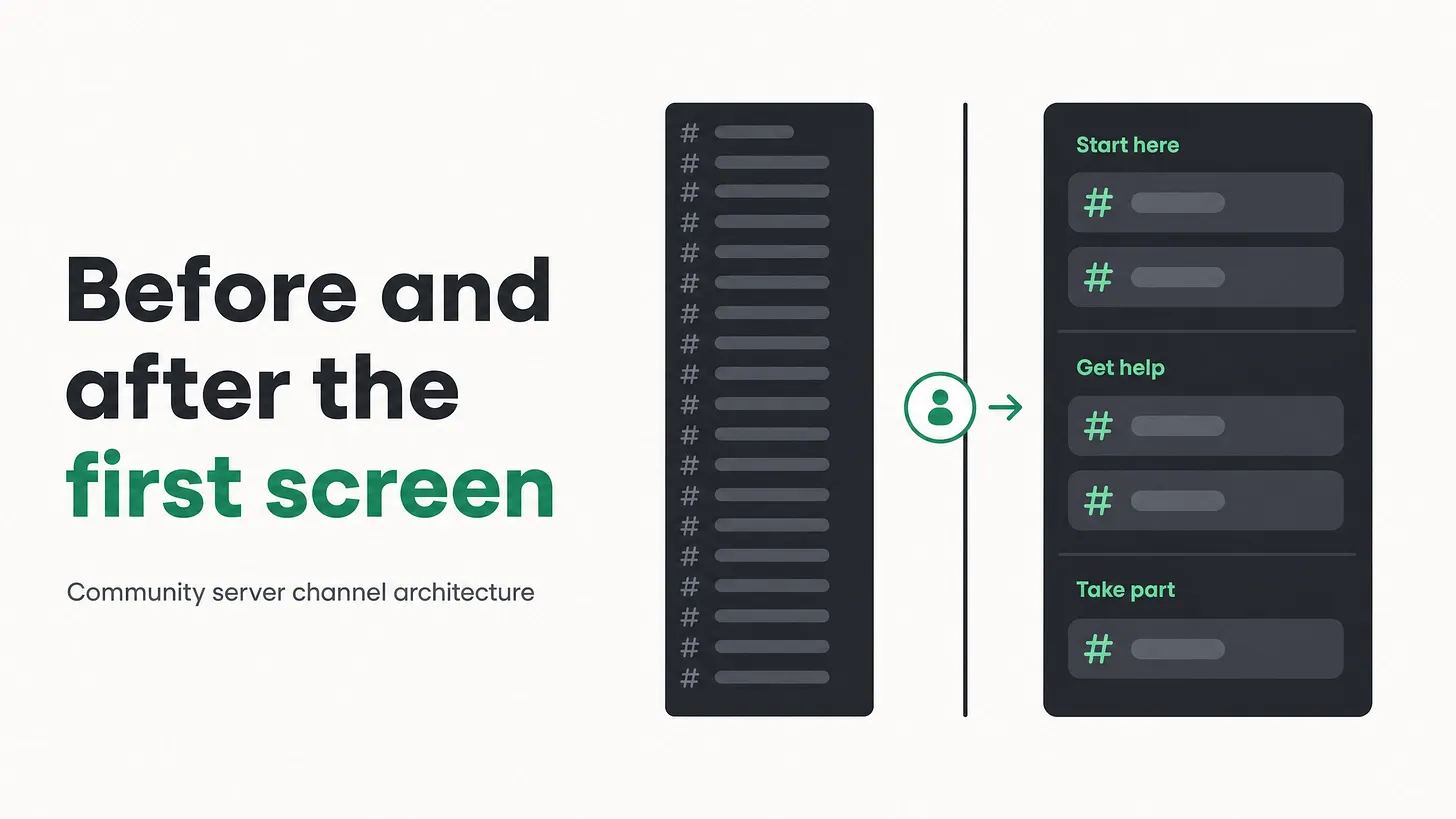
📌 Discord channel structure for new members should be designed like a landing page, not an internal directory. The arrival screen answers three questions in order, shows very few channels, and reveals everything else through roles. Name channels by member intent, ask one question at the door, and test every name by finishing the sentence: a member comes here when they want to.
The before
Open your server the way a stranger does, in a fresh window, signed out of everything you know about it.
Here is what most people see. Around thirty channels in a single long column. Announcements at the top. General below it. Off topic, memes, introductions. Three channels named after internal projects, which mean nothing to anybody outside the company. Two channels created for a campaign that ended and never removed. Support somewhere near the bottom, competing for attention with a channel that has eleven messages in it from last year.
The grouping, where it exists, follows the shape of the company. This team wanted a channel, so there is a channel. That is a filing system, and filing systems are built for people who already know what they are looking for.
A new member is the opposite of that person. They have thirty seconds of patience, no vocabulary for your internal names, and one question they cannot articulate: what am I supposed to do here. The long column answers none of it, so they post hi in general and never return.
The honest test is the incognito test. Load your server as a stranger and time how long it takes to find where you would ask for help. If it takes more than a few seconds, your support layer is fine and your architecture is hiding it.
The after
The arrival screen answers three questions, in this order.
- What is this place? One channel, read only, four lines maximum. Who this server is for, what happens here, what it is not. Not a wall of rules, a short orientation.
- What do I do first? One channel with a single obvious action. Introduce yourself with three prompts, or pick a role, or read one thing. One action, not a menu.
- Where do I get help? One or two channels, named for the situation a member is in rather than the department that handles it.
Everything else is hidden on arrival and revealed by role. Not because members cannot be trusted, but because a first screen with five clear options converts better than one with thirty. That is not a community principle, it is the same principle any landing page follows.
| Before | After |
|---|---|
| Around thirty visible channels, ungrouped or grouped by internal team | Five or six visible channels in three named groups |
| Support near the bottom of a long list | Support in the top group, named for the member's situation |
| Channels named after internal projects and departments | Channels named after what a member wants to do |
| Dead campaign channels left in place | Archived, with history preserved and visibility removed |
| Everything visible to everybody immediately | Progressive reveal through roles as members do things |
| No signal about where members came from | One question at the door, answered in three seconds |
Naming is the cheapest fix on the list
Most servers do not have too many channels. They have channels nobody can identify from the name.
Run the read aloud test. Say each channel name, then finish this sentence out loud: a member comes here when they want to. If you cannot finish it in one clause, the channel is misnamed, redundant, or should not be visible to a new arrival.
Channel names written for the company read like an org chart. Channel names written for members read like a set of intentions.
A few patterns that hold up. Name the situation rather than the team, so something like getting started beats onboarding squad. Name the verb rather than the noun where you can, because members arrive wanting to do something. Keep names short enough that they do not truncate on a phone, which is where most members are reading them.
Progressive reveal, done with roles
The first screen stays small because most channels are attached to a role, and roles arrive as members do things.
| Trigger | Unlocks | |
|---|---|---|
| ARRIVAL | None | what this is, do this first, get help |
| VERIFIED | completed the first action | main conversation, announcements |
| ACTIVE | participation over time | topic channels, events |
| CUSTOMER | verified purchase or plan | paid or account specific support, upgrade path channels |
| CONTRIBUTOR | invited, or met a published condition | feedback intake, early access, contributor space |
Two benefits, one obvious and one not. The obvious one is a calm first screen. The quieter one is that every unlock becomes a small moment of progress, and progress is what makes somebody come back tomorrow.
Ask one question at the door
Add a single question to the first action: where did you come from.
Three seconds for the member, and for your team it is the only reliable way to learn which channel of yours is actually bringing people in. Newsletter, a video, a search result, a friend, a partner. That one field turns your community from a place people appear into a place you can attribute.
The teams that know where their members came from make better decisions about where to spend the next quarter. The ones that do not are guessing with confidence.
What to do with the dead channels
Archive rather than delete. History has value, and deleting it destroys context for the people who were there.
But visibility is not the same as existence. A channel with no post in months is taking up attention on your most valuable screen and returning nothing, so remove it from view and keep the record. If somebody misses it, that is useful information and it takes a minute to restore.
Where this layer sits
Channel architecture sits directly beneath onboarding and support routing. It decides what a member meets first, which decides whether they ever reach the parts of your operation that work.
This is why teams with genuinely good support, real documentation and attentive moderators still see poor retention. The layers are fine and the front door is unreadable, so most arrivals never get far enough to encounter any of it. Fix the first screen and everything above it starts performing better without changing anything else.
Do this in an afternoon
- Load your server signed out and time how long it takes to find where to ask for help
- Write the three arrival questions and assign one channel to each
- Run the read aloud test on every visible channel name
- Move everything that fails behind a role
- Archive channels with no recent activity, preserving history
- Rename channels by member intent instead of internal team
- Add the where did you come from question to the first action
The strongest servers I have seen looked almost empty on arrival. That was not neglect, it was somebody deciding that a stranger should have exactly three things to read and one thing to do. Everything else was earned. More at danieljeong.org.